Portals: Difference between revisions
Jump to navigation
Jump to search
m 25 revisions imported: Copied from Official Wiki https://geometrydash.wiki.gg/index.php?title=Portals&oldid=255740 ; contributors: https://geometrydash.wiki.gg/index.php?title=Portals&action=history |
Hide main-image metadata output |
||
| (6 intermediate revisions by the same user not shown) | |||
| Line 1: | Line 1: | ||
<span style="display:none;">{{#setmainimage:CubePortal.png}}</span> | |||
'''Portals''' are special [[objects]] in [[Geometry Dash]], [[Geometry Dash Lite]], [[Geometry Dash Meltdown]], [[Geometry Dash World]] and [[Geometry Dash SubZero]]. They modify how the level is interacted with as well as change the icon into different forms, each with unique gameplay. | |||
==Description== | |||
{| class="wikitable" | |||
|+Form portals | |||
! rowspan="2" |Type | |||
! colspan="2" |Portal | |||
! rowspan="2" |Form | |||
! colspan="2" |Description | |||
! colspan="2" |Technical details | |||
! colspan="5" |Introduced | |||
|- | |||
!Normal | |||
!Labelled | |||
!Regular size | |||
!Mini size | |||
!Vertical grid | |||
!Safe contact | |||
!Geometry Dash | |||
!GD Lite | |||
!GD Meltdown | |||
!GD World | |||
!GD SubZero | |||
|- id="Cube" | |||
|Cube | |||
|[[File:CubePortal.png|60px]] | |||
|[[File:CubePortalLabelled.png|60px]] | |||
| style="text-align:center;" |[[File:Cube001.png]] | |||
|Performs small jumps [2.1333 units] (can be sustained [2.233 units]) given that there is contact with a surface and falls steeply | |||
|Performs smaller jumps [1.3583 units] so can jump faster in succession [1.435 units] | |||
|80+ units, no ceiling | |||
|In the direction of gravity; H-blocks above and below | |||
|Initial release: [[Stereo Madness]] | |||
|Initial release: [[Stereo Madness]] | |||
|Initial release: [[The Seven Seas]] | |||
|Initial release: [[Dashlands#Payload|Payload]] | |||
|Initial release: [[Press Start]] | |||
|- id="Ship" | |||
|Ship | |||
| rowspan="2" |[[File:ShipPortal.png|60px]] | |||
| rowspan="2" |[[File:ShipPortalLabelled.png|60px]] | |||
| style="text-align:center;" |[[File:Ship001.png]] | |||
| rowspan="2" |Propels rapidly upwards (can be sustained) and naturally descends gradually | |||
| rowspan="2" |Ascends and descends faster | |||
| rowspan="2" |10 units | |||
| rowspan="2" |Above and below | |||
|Initial release: [[Stereo Madness]] | |||
|Initial release: [[Stereo Madness]] | |||
|Initial release: [[The Seven Seas]] | |||
|Initial release: [[Dashlands#Machina|Machina]] | |||
|Initial release: [[Press Start]] | |||
|- id="Jetpack" | |||
|Jetpack <sup>1</sup> | |||
| style="text-align:center;" |[[File:Jetpack001.png]] | |||
|[[Update 2.2]] | |||
| - | |||
| - | |||
| - | |||
| - | |||
|- id="Ball" | |||
|Ball | |||
|[[File:BallPortal.png|60px]] | |||
|[[File:BallPortalLabelled.png|60px]] | |||
| style="text-align:center;" |[[File:Ball001.png]] | |||
|Moves steeply by inverting gravity given that there is contact with a surface | |||
|Ascends and descends faster | |||
|8 units | |||
|Above and below | |||
|[[Update 1.2]]: [[Cycles]] | |||
|Update 2.0: [[Cycles]] | |||
|Initial release: [[Airborne Robots]] | |||
|Initial release: [[Toxic Factory#Embers|Embers]] | |||
|Initial release: [[Press Start]] | |||
|- id="UFO" | |||
|UFO | |||
|[[File:UFOPortal.png|60px]] | |||
|[[File:UFOPortalLabelled.png|60px]] | |||
| style="text-align:center;" |[[File:UFO001.png]] | |||
|Performs small hops [1.5666 units] and naturally descends gradually | |||
|Performs smaller hops [1.2 units] and descends faster | |||
|10 units | |||
|Above and below | |||
|[[Update 1.5]]: [[Theory of Everything]] | |||
|Update 2.12: [[Theory of Everything]] | |||
| - | |||
|Initial release: [[Toxic Factory#Space Pirates|Space Pirates]] <sup>2</sup> | |||
| - | |||
|- id="Wave" | |||
|Wave <sup>3</sup> | |||
|[[File:WavePortal.png|60px]] | |||
|[[File:WavePortalLabelled.png|60px]] | |||
| style="text-align:center;" |[[File:Wave001.png]] | |||
|Propels at an upward diagonal (can be sustained) and naturally descends at a downward diagonal, each at a constant speed; vertical speed always matches horizontal speed | |||
|Ascends and descends faster and at steeper angles; vertical speed is always double the horizontal speed | |||
|10 units | |||
|Ground and ceiling; D-blocks above and below | |||
|[[Update 1.9]]: [[Blast Processing]] | |||
|Update 2.21.4: [[Blast Processing]] | |||
| - | |||
|Initial release: [[Toxic Factory#Monster Dance Off|Monster Dance Off]] | |||
|Initial release: [[Nock Em]] | |||
|- id="Robot" | |||
|Robot | |||
|[[File:RobotPortal.png|60px]] | |||
|[[File:RobotPortalLabelled.png|60px]] | |||
| style="text-align:center;" |[[File:Robot001.png]] | |||
|Performs scaled jumps [up to 3.5111 units sustained] given that there is contact with a surface and falls steeply | |||
|Performs smaller jumps [up to 2.7666 units sustained] and descends faster | |||
|80+ units, no ceiling | |||
|In the direction of gravity; H-blocks above and below | |||
|[[Update 2.0]]: [[Geometrical Dominator]] | |||
|Update 2.21.4: [[The Cellar]] | |||
| - | |||
|Initial release <sup>4</sup> | |||
|Initial release: [[Press Start]] | |||
|- id="Spider" | |||
|Spider | |||
|[[File:SpiderPortal.png|60px]] | |||
|[[File:SpiderPortalLabelled.png|60px]] | |||
| style="text-align:center;" |[[File:Spider001.png]] | |||
|Teleports given that there is contact with a surface to the nearest overhead surface and inverts gravity | |||
|Performs identically | |||
|9 units | |||
|In the direction of gravity; H-blocks above and below | |||
|[[Update 2.1]]: [[Fingerdash]] | |||
| Update 2.21.7: [[Fingerdash]] | |||
| - | |||
|Initial release: [[The Challenge]] | |||
|Initial release: [[Nock Em]] | |||
|- id="Swing" | |||
|Swing <sup>3</sup> | |||
|[[File:SwingPortal.png|60px]] | |||
|[[File:SwingPortalLabelled.png|60px]] | |||
| style="text-align:center;" |[[File:Swing001.png]] | |||
|Moves gradually by inverting gravity | |||
|Ascends and descends faster | |||
|10 units | |||
|Above and below | |||
|[[Update 2.2]]: [[Dash]] | |||
| - | |||
| - | |||
|Update 2.2.14 <sup>4</sup> | |||
| - | |||
|} | |||
{| class="wikitable" | |||
|+Manipulation portals | |||
! rowspan="2" |Type | |||
! colspan="2" |Portal | |||
! rowspan="2" colspan="2" |Effect | |||
! colspan="5" |Introduced | |||
|- | |||
!Activation | |||
!Deactivation | |||
!Geometry Dash | |||
!GD Lite | |||
!GD Meltdown | |||
!GD World | |||
!GD SubZero | |||
|- id="Gravity" | |||
| rowspan="2" |Gravity | |||
| style="text-align:center;" |<span style="white-space:nowrap;">[[File:GravityPortalA.png|50px]] [[File:GravityPortalALabelled.png|62px]]</span> | |||
| style="text-align:center;" |<span style="white-space:nowrap;">[[File:GravityPortalB.png|50px]] [[File:GravityPortalBLabelled.png|62px]]</span> | |||
| rowspan="2" colspan="2" |Inverts the icon's gravity | |||
|Initial release: [[Dry Out]] | |||
|Update 1.4: [[Dry Out]] | |||
| - | |||
|Initial release: [[Dashlands#Frontlines|Frontlines]] | |||
|Initial release: [[Press Start]] | |||
|- | |||
| colspan="2" style="text-align:center;" |[[File:GravityPortalC.png|50px]] [[File:GravityPortalCLabelled.png|62px]] | |||
== | |[[Update 2.2]] <sup>5</sup> | ||
| - | |||
| - | |||
| - | |||
| - | |||
|- id="Mirror" | |||
|Mirror | |||
| style="text-align:center;" |[[File:MirrorPortalA.png|80px]] | |||
| style="text-align:center;" |[[File:MirrorPortalB.png|80px]] | |||
| colspan="2" |Reverses the screen direction | |||
|[[Update 1.1]]: [[Time Machine]] | |||
|Update 1.921: [[Time Machine]] | |||
| - | |||
|Initial release: [[Toxic Factory#Striker|Striker]] | |||
|Initial release: [[Nock Em]] | |||
|- id="Size" | |||
|Size | |||
| style="text-align:center;" |[[File:SizePortalA.png|60px]] | |||
| style="text-align:center;" |[[File:SizePortalB.png|60px]] | |||
| colspan="2" |Changes the icon's size | |||
|[[Update 1.4]]: [[Clutterfunk]] | |||
|Update 2.11: [[Clutterfunk]] | |||
| - | |||
|Initial release <sup>4</sup> | |||
|Initial release: [[Nock Em]] | |||
|- id="Speed" | |||
| rowspan="5" |Speed | |||
| colspan="2" style="text-align:center;" |[[File:SpeedPortal–.png|55px]] | |||
= | | rowspan="5" |Changes the horizontal movement speed | ||
| Slow (~0.807×, 8.372 grid units per second) | |||
|[[Update 1.7]] <sup>5</sup>, [[Update 1.8]]: [[Hexagon Force]] | |||
|Update 2.21.3: [[Hexagon Force]] | |||
| - | |||
|Initial release <sup>4</sup> | |||
|Initial release: [[Press Start]] | |||
|- | |||
| colspan="2" style="text-align:center;" |[[File:SpeedPortal+.png|45px]] | |||
== | |Normal (1.0×, 10.386 grid units per second) | ||
|[[Update 1.7]] <sup>5</sup>, [[Update 1.8]]: [[Hexagon Force]] | |||
|Update 2.21.3: [[Hexagon Force]] | |||
| - | |||
|Initial release <sup>4</sup> | |||
|Initial release: [[Press Start]] | |||
|- | |||
| colspan="2" style="text-align:center;" |[[File:SpeedPortal++.png|70px]] | |||
* | |Fast (~1.243×, 12.914 grid units per second) | ||
* | |[[Update 1.7]]: [[Electrodynamix]] | ||
*UFO portal: The | |Update 2.21: [[Electrodynamix]] | ||
* | | - | ||
== | |Initial release <sup>4</sup> | ||
<gallery | |Initial release: [[Press Start]] | ||
|- | |||
| colspan="2" style="text-align:center;" |[[File:SpeedPortal+++.png|95px]] | |||
|Very fast (~1.502×, 15.6 grid units per second) | |||
|[[Update 1.7]]: [[Electrodynamix]] | |||
|Update 2.21: [[Electrodynamix]] | |||
| - | |||
|Initial release <sup>4</sup> | |||
|Initial release: [[Press Start]] | |||
|- | |||
| colspan="2" style="text-align:center;" |[[File:SpeedPortal++++.png|95px]] | |||
|Extremely fast (~1.849×, 19.2 grid units per second) | |||
|[[Update 2.1]] <sup>5</sup> | |||
| - | |||
| - | |||
|Initial release <sup>4</sup> | |||
| - | |||
|- id="Dual" | |||
|Dual | |||
| style="text-align:center;" |[[File:DualPortalA.png|50px]] | |||
| style="text-align:center;" |[[File:DualPortalB.png|50px]] | |||
| colspan="2" |Creates a second icon with inverted colours and gravity | |||
|[[Update 1.8]]: [[Hexagon Force]] | |||
|Update 2.21.3: [[Hexagon Force]] | |||
| - | |||
|Initial release <sup>4</sup> | |||
| - | |||
|- id="Teleportation" | |||
|Teleportation | |||
| style="text-align:center;" |[[File:TeleportationPortalA.png|65px]] | |||
| style="text-align:center;" |[[File:TeleportationPortalB.png|65px]] | |||
| colspan="2" |Teleports the icon between portals along the y-axis ''(advanced: and x-axis)'' | |||
|[[Update 2.0]]: [[Deadlocked]] | |||
| - | |||
| - | |||
|Initial release <sup>4</sup> | |||
|Initial release: [[Press Start]] | |||
|} | |||
;Notes | |||
*<sup>1</sup> Substitutes the ship in platformer levels | |||
*<sup>2</sup> Form introduced at the start of the level, portal not shown | |||
*<sup>3</sup> Not yet available in platformer levels | |||
*<sup>4</sup> Available from [[User Levels|user levels]] | |||
*<sup>5</sup> Available from user levels and usable in the [[Level Editor|level editor]] | |||
==Trivia== | |||
*If entering a form portal corresponding to the icon's current form and the portal is of a higher or lower position to the previous portal, the grid will vertically shift to realign with the new portal, with the exception of the cube and robot portals which do not lock the grid. This is demonstrated only once in a main level, [[Stereo Madness]], with the alternate route for the third secret coin. | |||
*Until [[Fingerdash]] was released, main levels always featured all previously released forms. | |||
*The cube's mechanics were inspired by the 2009 game [[Wikipedia:The Impossible Game|The Impossible Game]]. | |||
*[[Dashlands#Years-0|Years]], [[Toxic Factory#Space Pirates-0|Space Pirates]] and [[Toxic Factory#Embers-0|Embers]] are the only main levels to omit the cube form and neither start with it. | |||
*Until [[Update 1.4]], the ship only used the selected primary colour with slight shading. This can still be observed from the images in the ''How to play'' section of the [[Settings]] menu. | |||
*The ship, jetpack and UFO each carry a slightly shrunken version of the selected cube design. | |||
*Under the Options section of the Settings menu, the cube and ball can be configured to each use an alternate mini icon design that substitutes the Icon Kit selection, and are not displayed in the [[Icon Kit]]. While the ship and UFO are under the effects of the size portal, they also display the cube's alternative mini design. Prior to [[Update 2.0]], this was the default and only configuration. | |||
*The wave's name, design and mechanics were inspired by the 2014 game ''Wave Wave'' by Thomas Janson. | |||
*Mathematically, the wave's movement can be mapped as: | |||
**Regular: slope = ±1 / ±45° | |||
**Mini: slope = ±2 / ~±63.435° | |||
*Due to unchanging momentum, the wave does not respond to jump pads or rings, while gravity pads and rings flip gravity on contact without further effect on momentum. | |||
*Similar to other decorative level elements that pulsate to the music, the wave's trail will also pulsate to the music in Normal mode. | |||
*The robot portal is the only form portal that does not share its colours with a manipulation portal. | |||
*The swing's name and mechanics were inspired by the game 2014 game [[Wikipedia:Swing Copters|Swing Copters]]. | |||
*Entering form portals triggers a brief coloured inward pulse to occur as the icon passes through: | |||
**The cube portal lacks this effect. | |||
**The ship portal has a purple flash. | |||
**The ball portal has a red flash. | |||
**The UFO portal has a yellow flash. | |||
**The wave portal has a yellow flash and thin icon-primary-coloured outward pulse. | |||
**The robot portal has a red flash. | |||
**The spider portal has a red flash. | |||
**The swing portal has a yellow flash. | |||
*Prior to its formal introduction, the deactivation gravity portal is encountered in [[Back On Track]] and [[Polargeist]] as part of collecting [[Collectibles|secret coins]], being implemented in [[Update 1.6]]. | |||
*The size portal is the only manipulation portal that neither its activation nor deactivation variant uses the colour blue. | |||
*While under the effects of the dual portal, a crash with either icon will terminate the other, although they cannot collide with each other. | |||
*While under the effects of the dual portal, the grid is locked to 9 vertical units, unless at least one of the forms is a ship, a UFO, a swing, or a wave, where the grid is then locked to 10 vertical units. | |||
*While under the effects of the dual portal, it is apparent that the intended gameplay will be counteracted if both icons of identical form acquire the same direction of gravity, causing an overlap and rendering only one icon for interaction. For this reason, in any case of dual icons of the same form, should one trigger a flip of gravity, both icons will have their gravity flipped to remain at inverted vertical positions. However, both balls and both spiders under the effects of the dual portal have independent gravity states so are not bound to inverted vertical positions. Moreover, the overlap issue is mitigated with an additional mechanic that if both balls are brought into the same direction of gravity, as the oncoming ball makes direct contact with the initial ball, the latter will emit an outward pulse and will reinvert the gravity of the oncoming ball automatically. Although the spider is also subject to the overlap issue, this mechanic as implemented for the ball is absent, allowing both spiders to overlap, nullifying the dual mechanic. | |||
*The colours of the teleportation portals are a reference to the game series ''Portal'', with blue being the entry portal colour and orange being the exit portal colour. | |||
*Using teleportation portals that exit outside of the grid will result in the icon being returned beside the nearest boundary with no realignment of the grid. This does not occur for the cube or robot since they are not limited by a ceiling. | |||
*Entering manipulation portals triggers additional visual cues with colours matching the active portal: | |||
**The gravity portal triggers brief coloured lines moving in the direction of the gravity. | |||
**The mirror portal triggers every object to move horizontally towards the opposite side of the screen. | |||
**The size portal triggers a bolt of coloured lightning striking the icon along with the screen flashing twice, referencing the lightning bolt in the Super Mario Kart series. | |||
**The speed portal triggers coloured particles moving against the direction of the icon for a short time. | |||
**The teleportation portal triggers a bolt of lightning between the two portals along with the screen flashing briefly. | |||
{{Togglebox | |||
|header = Animated gallery | |||
|body = | |||
{{WIP}} | |||
====Icon animations==== | |||
<gallery mode="packed" class="icon-gallery"> | |||
RobotRunning.gif|Robot movement | |||
RobotJumping.gif|Robot jump | |||
RobotAirborne.gif|Robot airborne | |||
SpiderRunning.gif|Spider movement | |||
SpiderAirborne.gif|Spider airborne | |||
</gallery> | |||
====Form portals==== | |||
<gallery mode="packed"> | |||
CubePortalPreview.gif|Cube | |||
ShipPortalPreview.gif|Ship | |||
JetpackPortalPreview.gif|Jetpack | |||
BallPortalPreview.gif|Ball | |||
UFOPortalPreview.gif|UFO | |||
WavePortalPreview.gif|Wave | |||
RobotPortalPreview.gif|Robot | |||
SpiderPortalPreview.gif|Spider | |||
SwingPortalPreview.gif|Swing | |||
</gallery> | |||
====Manipulation portals==== | |||
<gallery mode="packed"> | |||
YellowFreyaGravityPortalPreview.gif|Gravity, activation | |||
BlueMiaGravityPortalPreview.gif|Gravity, deactivation | |||
GreenMiaFreyaGravityPortalPreview.gif|Gravity, toggle | |||
OrangeMirrorPortalPreview.gif|Mirror, activation | |||
BlueMirrorPortalPreview.gif|Mirror, deactivation | |||
PinkMiniPortalPreview.gif|Size, activation | |||
GreenMiniPortalPreview.gif|Size, deactivation | |||
X-1SpeedPortalPreview.gif|Speed, slow | |||
X1SpeedPortalPreview.gif|Speed, normal | |||
X2SpeedPortalPreview.gif|Speed, fast | |||
X3SpeedPortalPreview.gif|Speed, very fast | |||
X4SpeedPortalPreview.gif|Speed, extremely fast | |||
OrangeDualPortalPreview.gif|Dual, activation | |||
BlueDualPortalPreview.gif|Dual, deactivation | |||
TelePortalPreview.gif|Teleportation (along y-axis) | |||
TelePortalXAsisPreview.gif|Teleportation (along x-axis) | |||
</gallery> | </gallery> | ||
[[Category:Level | }} | ||
[[Category:Level editing (base content)]] | |||
Latest revision as of 05:26, 11 October 2026
Portals are special objects in Geometry Dash, Geometry Dash Lite, Geometry Dash Meltdown, Geometry Dash World and Geometry Dash SubZero. They modify how the level is interacted with as well as change the icon into different forms, each with unique gameplay.
Description
[edit | edit source]| Type | Portal | Form | Description | Technical details | Introduced | |||||||
|---|---|---|---|---|---|---|---|---|---|---|---|---|
| Normal | Labelled | Regular size | Mini size | Vertical grid | Safe contact | Geometry Dash | GD Lite | GD Meltdown | GD World | GD SubZero | ||
| Cube | 
|

|

|
Performs small jumps [2.1333 units] (can be sustained [2.233 units]) given that there is contact with a surface and falls steeply | Performs smaller jumps [1.3583 units] so can jump faster in succession [1.435 units] | 80+ units, no ceiling | In the direction of gravity; H-blocks above and below | Initial release: Stereo Madness | Initial release: Stereo Madness | Initial release: The Seven Seas | Initial release: Payload | Initial release: Press Start |
| Ship | 
|

|

|
Propels rapidly upwards (can be sustained) and naturally descends gradually | Ascends and descends faster | 10 units | Above and below | Initial release: Stereo Madness | Initial release: Stereo Madness | Initial release: The Seven Seas | Initial release: Machina | Initial release: Press Start |
| Jetpack 1 | 
|
Update 2.2 | - | - | - | - | ||||||
| Ball | 
|

|

|
Moves steeply by inverting gravity given that there is contact with a surface | Ascends and descends faster | 8 units | Above and below | Update 1.2: Cycles | Update 2.0: Cycles | Initial release: Airborne Robots | Initial release: Embers | Initial release: Press Start |
| UFO | 
|

|

|
Performs small hops [1.5666 units] and naturally descends gradually | Performs smaller hops [1.2 units] and descends faster | 10 units | Above and below | Update 1.5: Theory of Everything | Update 2.12: Theory of Everything | - | Initial release: Space Pirates 2 | - |
| Wave 3 | 
|

|

|
Propels at an upward diagonal (can be sustained) and naturally descends at a downward diagonal, each at a constant speed; vertical speed always matches horizontal speed | Ascends and descends faster and at steeper angles; vertical speed is always double the horizontal speed | 10 units | Ground and ceiling; D-blocks above and below | Update 1.9: Blast Processing | Update 2.21.4: Blast Processing | - | Initial release: Monster Dance Off | Initial release: Nock Em |
| Robot | 
|

|

|
Performs scaled jumps [up to 3.5111 units sustained] given that there is contact with a surface and falls steeply | Performs smaller jumps [up to 2.7666 units sustained] and descends faster | 80+ units, no ceiling | In the direction of gravity; H-blocks above and below | Update 2.0: Geometrical Dominator | Update 2.21.4: The Cellar | - | Initial release 4 | Initial release: Press Start |
| Spider | 
|

|

|
Teleports given that there is contact with a surface to the nearest overhead surface and inverts gravity | Performs identically | 9 units | In the direction of gravity; H-blocks above and below | Update 2.1: Fingerdash | Update 2.21.7: Fingerdash | - | Initial release: The Challenge | Initial release: Nock Em |
| Swing 3 | 
|

|

|
Moves gradually by inverting gravity | Ascends and descends faster | 10 units | Above and below | Update 2.2: Dash | - | - | Update 2.2.14 4 | - |
| Type | Portal | Effect | Introduced | ||||||
|---|---|---|---|---|---|---|---|---|---|
| Activation | Deactivation | Geometry Dash | GD Lite | GD Meltdown | GD World | GD SubZero | |||
| Gravity |  
|
 
|
Inverts the icon's gravity | Initial release: Dry Out | Update 1.4: Dry Out | - | Initial release: Frontlines | Initial release: Press Start | |
 
|
Update 2.2 5 | - | - | - | - | ||||
| Mirror | 
|

|
Reverses the screen direction | Update 1.1: Time Machine | Update 1.921: Time Machine | - | Initial release: Striker | Initial release: Nock Em | |
| Size | 
|

|
Changes the icon's size | Update 1.4: Clutterfunk | Update 2.11: Clutterfunk | - | Initial release 4 | Initial release: Nock Em | |
| Speed | 
|
Changes the horizontal movement speed | Slow (~0.807×, 8.372 grid units per second) | Update 1.7 5, Update 1.8: Hexagon Force | Update 2.21.3: Hexagon Force | - | Initial release 4 | Initial release: Press Start | |

|
Normal (1.0×, 10.386 grid units per second) | Update 1.7 5, Update 1.8: Hexagon Force | Update 2.21.3: Hexagon Force | - | Initial release 4 | Initial release: Press Start | |||

|
Fast (~1.243×, 12.914 grid units per second) | Update 1.7: Electrodynamix | Update 2.21: Electrodynamix | - | Initial release 4 | Initial release: Press Start | |||

|
Very fast (~1.502×, 15.6 grid units per second) | Update 1.7: Electrodynamix | Update 2.21: Electrodynamix | - | Initial release 4 | Initial release: Press Start | |||

|
Extremely fast (~1.849×, 19.2 grid units per second) | Update 2.1 5 | - | - | Initial release 4 | - | |||
| Dual | 
|

|
Creates a second icon with inverted colours and gravity | Update 1.8: Hexagon Force | Update 2.21.3: Hexagon Force | - | Initial release 4 | - | |
| Teleportation | 
|

|
Teleports the icon between portals along the y-axis (advanced: and x-axis) | Update 2.0: Deadlocked | - | - | Initial release 4 | Initial release: Press Start | |
- Notes
- 1 Substitutes the ship in platformer levels
- 2 Form introduced at the start of the level, portal not shown
- 3 Not yet available in platformer levels
- 4 Available from user levels
- 5 Available from user levels and usable in the level editor
Trivia
[edit | edit source]- If entering a form portal corresponding to the icon's current form and the portal is of a higher or lower position to the previous portal, the grid will vertically shift to realign with the new portal, with the exception of the cube and robot portals which do not lock the grid. This is demonstrated only once in a main level, Stereo Madness, with the alternate route for the third secret coin.
- Until Fingerdash was released, main levels always featured all previously released forms.
- The cube's mechanics were inspired by the 2009 game The Impossible Game.
- Years, Space Pirates and Embers are the only main levels to omit the cube form and neither start with it.
- Until Update 1.4, the ship only used the selected primary colour with slight shading. This can still be observed from the images in the How to play section of the Settings menu.
- The ship, jetpack and UFO each carry a slightly shrunken version of the selected cube design.
- Under the Options section of the Settings menu, the cube and ball can be configured to each use an alternate mini icon design that substitutes the Icon Kit selection, and are not displayed in the Icon Kit. While the ship and UFO are under the effects of the size portal, they also display the cube's alternative mini design. Prior to Update 2.0, this was the default and only configuration.
- The wave's name, design and mechanics were inspired by the 2014 game Wave Wave by Thomas Janson.
- Mathematically, the wave's movement can be mapped as:
- Regular: slope = ±1 / ±45°
- Mini: slope = ±2 / ~±63.435°
- Due to unchanging momentum, the wave does not respond to jump pads or rings, while gravity pads and rings flip gravity on contact without further effect on momentum.
- Similar to other decorative level elements that pulsate to the music, the wave's trail will also pulsate to the music in Normal mode.
- The robot portal is the only form portal that does not share its colours with a manipulation portal.
- The swing's name and mechanics were inspired by the game 2014 game Swing Copters.
- Entering form portals triggers a brief coloured inward pulse to occur as the icon passes through:
- The cube portal lacks this effect.
- The ship portal has a purple flash.
- The ball portal has a red flash.
- The UFO portal has a yellow flash.
- The wave portal has a yellow flash and thin icon-primary-coloured outward pulse.
- The robot portal has a red flash.
- The spider portal has a red flash.
- The swing portal has a yellow flash.
- Prior to its formal introduction, the deactivation gravity portal is encountered in Back On Track and Polargeist as part of collecting secret coins, being implemented in Update 1.6.
- The size portal is the only manipulation portal that neither its activation nor deactivation variant uses the colour blue.
- While under the effects of the dual portal, a crash with either icon will terminate the other, although they cannot collide with each other.
- While under the effects of the dual portal, the grid is locked to 9 vertical units, unless at least one of the forms is a ship, a UFO, a swing, or a wave, where the grid is then locked to 10 vertical units.
- While under the effects of the dual portal, it is apparent that the intended gameplay will be counteracted if both icons of identical form acquire the same direction of gravity, causing an overlap and rendering only one icon for interaction. For this reason, in any case of dual icons of the same form, should one trigger a flip of gravity, both icons will have their gravity flipped to remain at inverted vertical positions. However, both balls and both spiders under the effects of the dual portal have independent gravity states so are not bound to inverted vertical positions. Moreover, the overlap issue is mitigated with an additional mechanic that if both balls are brought into the same direction of gravity, as the oncoming ball makes direct contact with the initial ball, the latter will emit an outward pulse and will reinvert the gravity of the oncoming ball automatically. Although the spider is also subject to the overlap issue, this mechanic as implemented for the ball is absent, allowing both spiders to overlap, nullifying the dual mechanic.
- The colours of the teleportation portals are a reference to the game series Portal, with blue being the entry portal colour and orange being the exit portal colour.
- Using teleportation portals that exit outside of the grid will result in the icon being returned beside the nearest boundary with no realignment of the grid. This does not occur for the cube or robot since they are not limited by a ceiling.
- Entering manipulation portals triggers additional visual cues with colours matching the active portal:
- The gravity portal triggers brief coloured lines moving in the direction of the gravity.
- The mirror portal triggers every object to move horizontally towards the opposite side of the screen.
- The size portal triggers a bolt of coloured lightning striking the icon along with the screen flashing twice, referencing the lightning bolt in the Super Mario Kart series.
- The speed portal triggers coloured particles moving against the direction of the icon for a short time.
- The teleportation portal triggers a bolt of lightning between the two portals along with the screen flashing briefly.
Animated gallery

Icon animations
-
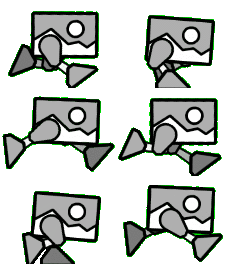 Robot movement
 -
 Robot jump
 -
 Robot airborne
 -
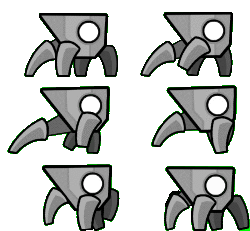 Spider movement
 -
 Spider airborne


Form portals
-
 Cube
Cube -
 Ship
Ship -
 Jetpack
 -
 Ball
Ball -
 UFO
UFO -
 Wave
Wave -
 Robot
Robot -
 Spider
 -
 Swing
Swing


Manipulation portals
-
 Gravity, activation
 -
 Gravity, deactivation
 -
 Gravity, toggle
 -
 Mirror, activation
 -
 Mirror, deactivation
 -
 Size, activation
 -
 Size, deactivation
 -
 Speed, slow
 -
 Speed, normal
 -
 Speed, fast
 -
 Speed, very fast
 -
 Speed, extremely fast
 -
 Dual, activation
 -
 Dual, deactivation
 -
 Teleportation (along y-axis)
 -
 Teleportation (along x-axis)


