Pause Menu: Difference between revisions
Jump to navigation
Jump to search
geometrydash.wiki.gg>Rexster930 m →Trivia: clean up |
m 25 revisions imported: Copied from Official Wiki https://geometrydash.wiki.gg/index.php?title=Pause+Menu&oldid=264129 ; contributors: https://geometrydash.wiki.gg/index.php?title=Pause+Menu&action=history |
| (2 intermediate revisions by one other user not shown) | |
(No difference)
| |
Latest revision as of 07:36, 11 October 2026

PauseMenu.png
The Pause Menu is a feature of Geometry Dash, Geometry Dash Lite, Geometry Dash Meltdown, Geometry Dash World, and Geometry Dash SubZero. It can be accessed during levels using the Esc key (Steam) or the pause button in the upper-right corner (mobile).
Description
[edit | edit source]The pause menu displays the following:
- Level name
- Normal mode and practice mode first-time progress meters (classic level only)
- Elapsed time playing level (platformer level only)
- The number of points the player has if enabled by the level. (platformer level only)
- Buttons to restart the level without checkpoints (platformer level only), to enable practice mode, to resume playing the level, to quit the level and to restart the level.
- Music and SFX volume sliders
- A button to access an extended settings menu, displaying:
- Ignore Damage (level editor only): Icon will not take damage and will clip through objects that otherwise would have resulted in a crash (level verification is disabled).
- Auto-Retry: (enabled by default) Automatically respawns the icon upon crashing. When disabled, a pop-up showing the percentage achieved appears instead.
- Auto-Checkpoints: (enabled by default) Automatically places checkpoints while in practice mode. The rate differs depending on the icon's form.
- Show Progress Bar: Displays a progress bar at the top of the screen (classic level only).
- Show Percentage: Displays a percentage showing level progress at the top of the screen (classic level only).
- Show Time: Displays the elapsed time (platformer level only).
- Audio Visualizer: Displays two bars at the upper left of the screen, indicating the current audio levels, a left bar for Song and a right bar for SFX.
- Show Info Label: Shows info label with things like how many things are moving, rotating, scaling and following on the screen, how many songs and SFX is playing and more.
- Disable Checkpoints: Decreases the frequency of automatic checkpoint placement (when enabled) (classic level), disables checkpoints (platformer level).
- Practice Music Sync: (requires Music Unlocker from the Diamond Shop) Reverts the practice mode music to the normal mode music.
- Show Hitboxes: Displays hitboxes while in practice mode.
- Show Hitbox On Death: On death shows the hitboxes around the player.
- Platformer UI: (mobile only) Accesses a configurator for the platformer UI. Upon entering, three configuration profiles can be selected to edit/save or load.
- ModeB toggle
- Snap toggle
- JumpL toggle
- Split toggle
- Dual toggle
- Width slider
- Height slider
- Scale slider
- Opacity slider
- Deadzone slider
- Radius slider
- Move left/move right button positioning
- Practice UI: (mobile only) Accesses a configurator for the practice mode UI.
- Opacity slider
- Place checkpoint / remove checkpoint button positioning
Trivia
[edit | edit source]- There used to be no delay on when the player could pause, which allowed pause buffering, where the player could time their inputs better and allowed near-impossible levels like Sakupen circles to be beaten.[YouTube 1]
- This technique was later banned by the Demonlist, making any completions using it invalid.[Discord 1]
- It was finally patched in Update 2.206 when a delay was added that made it so that pausing three times in a short period results in being only allowed to pause once, nerfing pause buffering.
Gallery
[edit | edit source]-
 Platformer level pause menu
 -
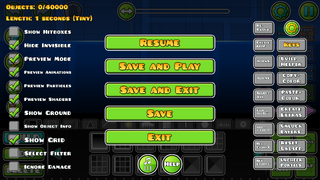 Editor level test pause menu
 -
 Pause menu settings
 -
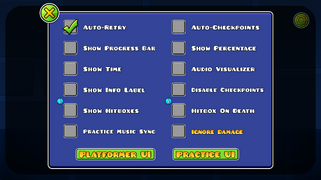 Pause menu settings with the exclusive level editor option "Ignore Damage"
 -
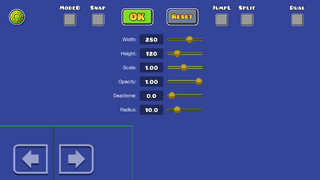 Platformer UI configurator
 -
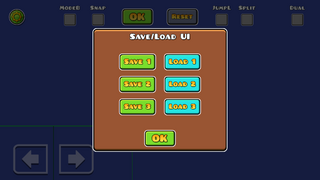 UI profile selection
 -
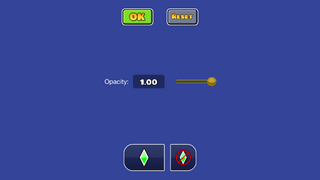 Practice mode UI configurator
 -
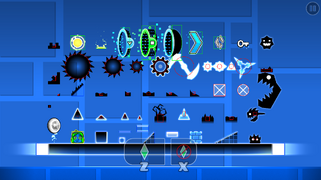 Show Hitboxes (On practice) setting activated.
 -
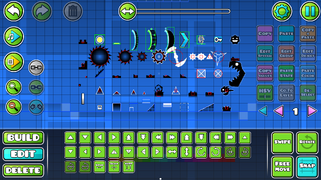 Show Hitboxes (On editor) setting activated.
 -
 Hitboxes on Death setting activated.


References
[edit | edit source]YouTube
[edit | edit source]Discord
[edit | edit source]Note: Must be in the Demon List public server to view this message.