geometrydash.wiki.gg>Xxjw34 |
|
| (32 intermediate revisions by 5 users not shown) |
| Line 5: |
Line 5: |
| Stars= | | Stars= |
| {{WIP}} | | {{WIP}} |
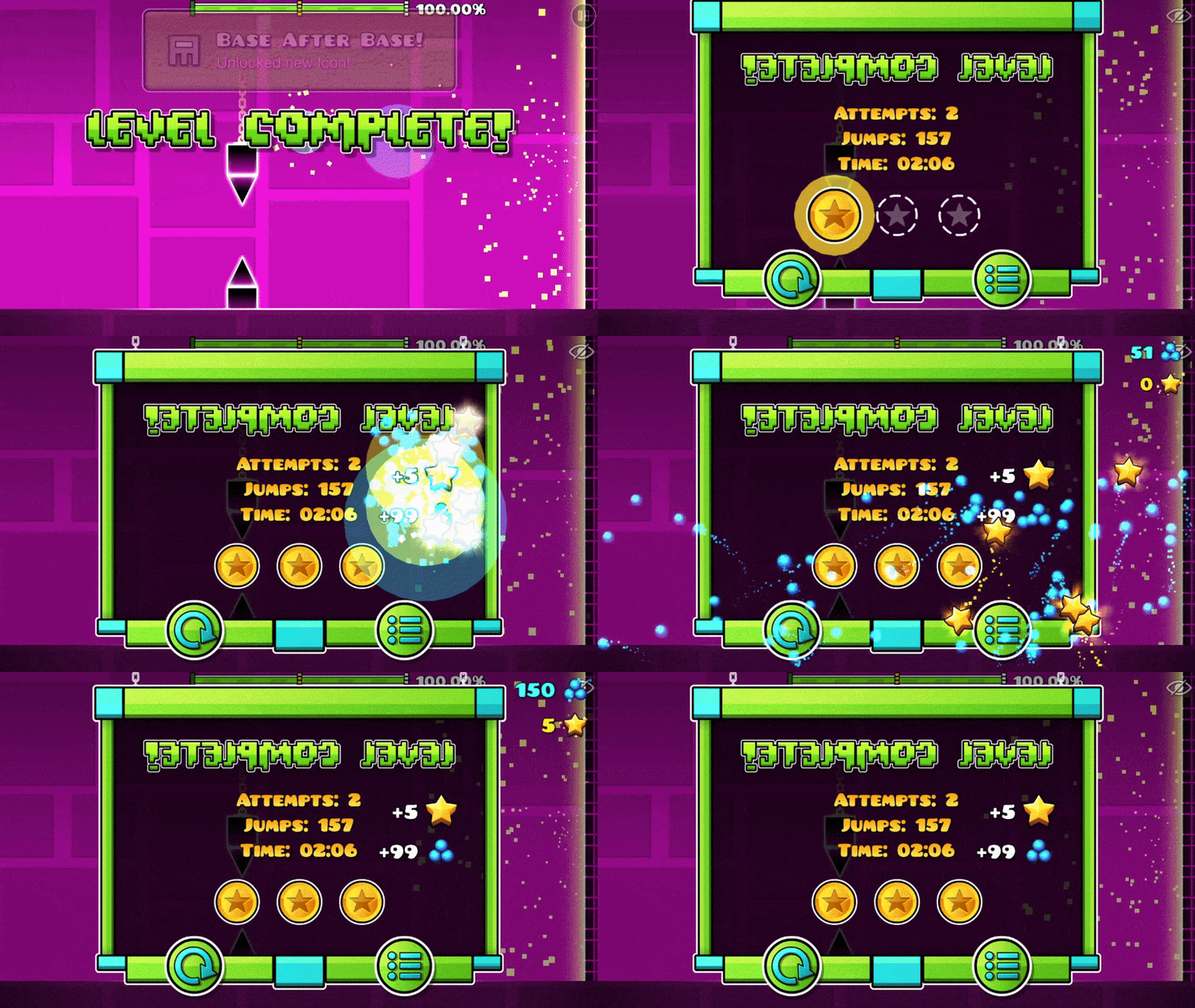
| '''Stars''' were introduced in [[Update 1.3]] and are present in all Geometry Dash games. Completing any level in normal mode, with the exception of [[User Levels|user levels]] which have not received a star rating, will reward a set number of stars. They are also rewarded for completing [[Map Packs|map packs]], in addition to those rewarded for completing the included levels. Stars contribute towards unlocking icons and achievements, progressing paths, as well as determining placement on the [[Leaderboards]]. | | '''Stars''' were introduced in [[Update 1.3]] and are present in all [[Geometry Dash]] games. Completing any classic level in normal mode, with the exception of [[User Levels|user levels]] which have not received a star rating, will reward a set number of stars. They are also rewarded for completing [[Map Packs]], in addition to those rewarded for completing the included levels. Stars contribute towards unlocking icons and achievements, progressing paths, as well as determining placement on the [[Leaderboards]]. |
|
| |
|
| A total of 2,838 stars can be earned from completing official content: | | A total of 2,838 stars can be earned from completing official content: |
| *199 stars are rewarded for completing main levels, with up to 15 stars per level. | | *199 stars are rewarded for completing main levels, with up to 15 stars per level. |
| **Geometry Dash Lite rewards 160 stars from this method. | | **[[Geometry Dash Lite]] rewards 160 stars from this method. |
| **Geometry Dash Meltdown rewards 6 stars from this method. | | **[[Geometry Dash Meltdown]] rewards 6 stars from this method. |
| **Geometry Dash World rewards 28 stars from this method. | | **[[Geometry Dash World]] rewards 28 stars from this method. |
| **Geometry Dash SubZero rewards 18 stars from this method. | | **[[Geometry Dash SubZero]] rewards 18 stars from this method. |
| *1,818 stars are rewarded from completing map packs, divided between 1,365 level stars and 453 pack stars, with up to 10 stars per level and per pack. | | *1,818 stars are rewarded from completing map packs, divided between 1,365 level stars and 453 pack stars, with up to 10 stars per level and per pack. |
| *818 stars are rewarded from completing [[Gauntlets|gauntlet]] levels, with up to 10 stars per level. | | *818 stars are rewarded from completing [[Gauntlets|gauntlet]] levels, with up to 10 stars per level. |
| Line 42: |
Line 42: |
| Moons= | | Moons= |
| {{WIP}} | | {{WIP}} |
| '''Moons''' were introduced in [[Update 2.2]] and are present in Geometry Dash, Geometry Dash Lite, and Geometry Dash World. Completing rated platformer levels in normal mode rewards a set number of moons. Moons contribute towards unlocking icons and achievements and progressing paths. | | '''Moons''' were introduced in [[Update 2.2]] and are present in [[Geometry Dash]], [[Geometry Dash Lite]], and [[Geometry Dash World]]. Completing rated platformer levels in normal mode rewards a set number of moons. Moons contribute towards unlocking icons and achievements and progressing paths. |
|
| |
|
| A total of 25 moons can be earned from completing official content: | | A total of 25 moons can be earned from completing official content: |
| Line 69: |
Line 69: |
| |-| | | |-| |
| Secret coins= | | Secret coins= |
| '''Secret coins''' were introduced in [[Update 1.6]] and are present in Geometry Dash, Geometry Dash Lite, Geometry Dash Meltdown, and Geometry Dash Subzero. They are collected within main levels during gameplay and obtained by completing [[Map Packs|map packs]]. For those within levels, although it is not necessary to collect all three secret coins in one attempt, they will be lost if crashing before reaching the level's end. Once successfully collected, secret coins will be replaced by white outlines on subsequent attempts. They cannot be collected in [[Practice Mode|practice mode]]. Secret coins contribute towards unlocking icons and achievements, as well as the Demon difficulty main levels. | | '''Secret coins''' were introduced in [[Update 1.6]] and are present in [[Geometry Dash]], [[Geometry Dash Lite]], [[Geometry Dash Meltdown]], and [[Geometry Dash SubZero]]. They are collected within main levels during gameplay and obtained by completing [[Map Packs|map packs]]. For those within levels, although it is not necessary to collect all three secret coins in one attempt, they will be lost if crashing before reaching the level's end. Once successfully collected, secret coins will be replaced by white outlines on subsequent attempts. They cannot be collected in [[Practice Mode|practice mode]]. Secret coins contribute towards unlocking icons and achievements, as well as the Demon difficulty main levels. |
|
| |
|
| A total of 164 secret coins can be obtained: | | A total of 164 secret coins can be obtained: |
| Line 216: |
Line 216: |
| |-| | | |-| |
| User coins= | | User coins= |
| '''User coins''' were introduced in [[Update 2.0]] and are present in Geometry Dash, Geometry Dash Lite, and Geometry Dash World. They serve the purpose of secret coins for [[User Levels|user levels]] and function almost identically. They contribute towards unlocking icons and achievements, as well as the [[Vault]]. | | '''User coins''' were introduced in [[Update 2.0]] and are present in [[Geometry Dash]], [[Geometry Dash Lite]], and [[Geometry Dash World]]. They serve the purpose of secret coins for [[User Levels|user levels]] and function almost identically. They contribute towards unlocking icons and achievements, as well as the [[Vault]]. |
| Up to three user coins are offered for use in the [[Level Editor|level editor]]. It is required that they are able to be collected as part of the level verification process. Upon submitting a user level that includes user coins, their colour will initially start as bronze and they will not count towards a player's user coin tally. After being verified by [[RobTop]], their colour will convert to silver and count towards a player's user coin tally. | | Up to three user coins are offered for use in the [[Level Editor|level editor]]. It is required that they are able to be collected as part of the level verification process. Upon submitting a user level that includes user coins, their colour will initially start as bronze and they will not count towards a player's user coin tally. After being verified by [[Robert Topala|RobTop]], their colour will convert to silver and count towards a player's user coin tally. |
|
| |
|
| User coins can be viewed from the Icon Kit and stats record. User coins are visible to other players from a [[User Accounts|user profile]] and from the [[Leaderboards]]. | | User coins can be viewed from the Icon Kit and stats record. User coins are visible to other players from a [[User Accounts|user profile]] and from the [[Leaderboards]]. |
| Line 244: |
Line 244: |
| Mana orbs= | | Mana orbs= |
| {{WIP}} | | {{WIP}} |
| '''Mana orbs''' were introduced in [[Update 2.1]] and are present in Geometry Dash, Geometry Dash Lite, and [[Geometry Dash World]]. They serve as currency and are used to purchase items from each of the [[Shop]], [[Secret Shop]], [[Community Shop]] and [[Mechanic]]. A player's current total can be viewed from the Icon Kit or from a shop. The lifetime total of accumulated mana orbs can be viewed from the stats record. Mana orbs are not visible to other players. | | '''Mana orbs''' were introduced in [[Update 2.1]] and are present in [[Geometry Dash]], [[Geometry Dash Lite]], and [[Geometry Dash World]]. They serve as currency and are used to purchase items from each of the [[Shop]], [[Secret Shop]], [[Community Shop]] and [[Mechanic]]. A player's current total can be viewed from the Icon Kit or from a shop. The lifetime total of accumulated mana orbs can be viewed from the stats record. Mana orbs are not visible to other players. |
|
| |
|
| Mana orbs are accumulated by: | | Mana orbs are accumulated by: |
| Line 315: |
Line 315: |
| Diamonds= | | Diamonds= |
| {{WIP}} | | {{WIP}} |
| '''Diamonds''' were introduced in [[Update 2.1]] and are present in Geometry Dash, Geometry Dash Lite, and Geometry Dash World. Diamonds contribute towards unlocking icons and achievements, as well as the [[Vault of Secrets]], the secret level [[The Challenge]], and the extra shops in the [[Treasure Room]]. They are visible to other players from a [[User Accounts|user profile]] and from the [[Leaderboards]]. | | '''Diamonds''' were introduced in [[Update 2.1]] and are present in [[Geometry Dash]], [[Geometry Dash Lite]], and [[Geometry Dash World]]. They primarily serve as a measure of progress, helping unlock [[Icon Kit]] items, achievements, secret content, and shops. The total diamonds collected does not decrease when content is unlocked. The total can be viewed from the Icon Kit and stats record, and is visible to other players from a [[User Accounts|user profile]] and the [[Leaderboards]]. |
|
| |
|
| In [[Update 2.2]], a related currency called '''Diamond Shards''' was added; each Diamond earned also grants a Diamond Shard. Diamond Shards can be used to purchase items from the [[Diamond Shop]].
| | Diamonds are obtained by: |
| | *Opening [[Daily Rewards|daily chests]]. Small chests reward between 3 and 6 diamonds every four hours, while large chests reward between 9 and 15 diamonds every 24 hours. |
| | *Completing [[quests]], with Tier 1, Tier 2 and Tier 3 quests rewarding 10, 15 and 20 diamonds, respectively. |
| | *Opening chests in the [[Treasure Room]], which can contain varying quantities of diamonds depending on the chest. |
| | *Making progress in the [[Daily Level]], [[Weekly Demon]], [[Event Level]]s and [[Gauntlets|Gauntlet levels]]. |
| | *Opening the reward chest after completing the current Weekly Demon, which contains 20 diamonds in addition to other rewards. |
| | *Opening Event Level reward chests, which usually contain diamonds alongside shards and either a Demon Key or Gold Key. |
| | *Progressing through and completing Gauntlets, which provide additional diamond rewards. |
| | *Opening certain final chests obtained by completing [[Paths|Paths of Power]], which can reward 300 diamonds. |
|
| |
|
| Diamonds are obtained by:
| | Except for Auto levels, the number of diamonds available from progress in a selected user level is two greater than its star or moon rating. |
| *Opening the [[Daily Rewards|daily chests]].
| | |
| *Completing the [[Quests|daily quests]].
| | <div style="margin:0 -1rem;"> |
| *Opening the chest after beating the weekly demon.
| | {| class="wikitable" style="width:100%;" |
| *Opening chests from the [[Treasure Room]].
| | ! Difficulty |
| *Playing levels from [[gauntlets]].
| | ! Stars or moons |
| *Completing the [[Paths]].
| | ! Approximate progress per diamond |
| *Making forward progress in the [[Daily Level]] or [[Weekly Demon]]. With the exception of Auto levels, the number of available diamonds is always two greater than the level's star/moon rating, as shown below:
| | ! Total diamonds |
| {| class="wikitable" | | |- |
| !Difficulty | | | {{Auto|i}} Auto |
| !% per diamond | | | 1 |
| !Total | | | N/A |
| | | 0 |
| | |- |
| | | {{Easy|i}} Easy |
| | | 2 |
| | | 25% |
| | | 4 |
| | |- |
| | | {{Normal|i}} Normal |
| | | 3 |
| | | 20% |
| | | 5 |
| | |- |
| | | rowspan="2" | {{Hard|i}} Hard |
| | | 4 |
| | | 16.67% |
| | | 6 |
| | |- |
| | | 5 |
| | | 14.29% |
| | | 7 |
| | |- |
| | | rowspan="2" | {{Harder|i}} Harder |
| | | 6 |
| | | 12.5% |
| | | 8 |
| |- | | |- |
| |{{Auto|i}} Auto | | | 7 |
| |N/A | | | 11.11% |
| |0 | | | 9 |
| |- | | |- |
| |{{Easy|i}} Easy | | | rowspan="2" | {{Insane|i}} Insane |
| |25 | | | 8 |
| |4 | | | 10% |
| | | 10 |
| |- | | |- |
| |{{Normal|i}} Normal | | | 9 |
| |20 | | | 9.09% |
| |5 | | | 11 |
| |- | | |- |
| | rowspan="2"|{{Hard|i}} Hard | | | {{Demon|i}} Demon |
| |16.67 | | | 10 |
| |6 | | | 8.33% |
| | | 12 |
| | |} |
| | </div> |
| | |
| | Diamond rewards are granted upon reaching the relevant progress thresholds, with the final diamond awarded upon completing the level. |
| | |
| | Accumulating diamonds permanently unlocks several rooms and features: |
| | |
| | <div style="margin:0 -1rem;"> |
| | {| class="wikitable" style="width:100%;" |
| | ! Diamonds |
| | ! Unlock |
| |- | | |- |
| |14.3 | | | 50 |
| |7 | | | [[Vault of Secrets]] |
| |- | | |- |
| | rowspan="2"|{{Harder|i}} Harder | | | 200 |
| |12.5
| | | [[Community Shop]] |
| |8 | |
| |- | | |- |
| |11.11 | | | 200 |
| |9 | | | [[The Challenge]], after entering its code in the Vault of Secrets |
| |- | | |- |
| | rowspan="2"|{{Insane|i}} Insane | | | 500 |
| |10
| | | [[Secret Shop]] |
| |10 | |
| |- | | |- |
| |9.09 | | | 1,000 |
| |11 | | | [[Diamond Shop]] |
| |- | | |- |
| |{{Demon|i}} Demon | | | 2,000 |
| |8.33
| | | [[Mechanic]] |
| |12 | |
| |} | | |} |
| <gallery mode="packed" class="preview-gallery"> | | </div> |
| DailyRewardsGetVideo.gif|Diamonds from the daily chests. | | |
| DiamondsIconKit.png|Diamonds and Diamond shards on [[Icon Kit]]. | | Diamond milestones also unlock achievements and Icon Kit rewards, with achievement requirements extending to 25,000 diamonds. |
| | |
| | In [[Update 2.2]], a related spendable currency called '''diamond shards''' was introduced. Every diamond obtained also grants one diamond shard. Regular diamonds represent the lifetime total and are not spent, while diamond shards are consumed when purchasing items from the Diamond Shop. Spending diamond shards does not reduce the regular diamond total. |
| | |
| | Diamond shards can be used to purchase Icon Kit items and the [[Settings|Music Unlocker]], which enables normal-mode music during [[Practice Mode]]. As of Update 2.201, purchasing every available Diamond Shop item requires 34,800 diamond shards. |
| | |
| | <gallery mode="packed"> |
| | DailyRewardsGetVideo.gif|Diamonds being obtained from the daily chests |
| | DiamondsIconKit.png|Diamonds and diamond shards displayed in the Icon Kit |
| </gallery> | | </gallery> |
| | |
| <gallery mode="packed" class="icon-gallery"> | | <gallery mode="packed" class="icon-gallery"> |
| Diamond.png | | Diamond.png|Diamond |
| DiamondShards.png | | DiamondShards.png|Diamond shards |
| </gallery> | | </gallery> |
| | |
| |-| | | |-| |
| Keys= | | Keys= |
| '''Demon Keys''' were introduced in [[Update 2.1]] and are present in Geometry Dash, Geometry Dash Lite, and Geometry Dash World. They are obtained from [[Secret Room]] codes, daily chests, as event level rewards, or by surpassing an interval of 500 mana orbs, equivalent to beating a single Demon level. They are also obtainable via the final chests of some [[Paths]] and [[Gauntlets]]. | | Several types of '''keys''' are used to unlock chests, rooms, Gauntlets and other secret content. Demon Keys and Gold Keys can be collected repeatedly and are consumed when used to open their respective chests. The blue, green, orange and purple keys are unique progression items introduced in [[Update 2.1]]. |
| * If the player revisits a rated level that was previously unrated upon completion, keys can be stockpiled. For each new best record received on a subsequent level, Geometry Dash will reward the player with a key, depending on how many orbs were collected upon revisiting levels.
| |
|
| |
|
| Keys unlock the [[Treasure Room]], and this is the only place that they can be viewed. There are six different levels of chests split into two tiers, each requiring a different number of keys to open. In order, they cost 1, 5, 10, 25, 50, and 100 keys to open a single chest of each level. Even after opening all the chests, players will still be able to receive Demon Keys, though they are useless past this point. | | ;Demon Keys |
| | Demon Keys are present in [[Geometry Dash]], [[Geometry Dash Lite]], and [[Geometry Dash World]]. One Demon Key is obtained whenever the key progress meter accumulates 500 mana orbs. The mana orbs themselves are not spent when a key is earned. |
|
| |
|
| '''Gold Keys''' are similar to keys in that they are used to unlock chests in the [[Treasure Room]], however they are used to unlock gold chests instead. They can be obtained in reward chests from specific [[Event Level|Event Levels]] or from Secret Room codes. They can only be viewed on the fourth page of the Treasure Room, where they can be used to unlock the gold chests on that page.
| | Demon Keys can also be obtained by: |
| | *Opening [[Daily Rewards|daily chests]], which have a chance of containing a key. |
| | *Opening the reward chest after completing the [[Weekly Demon]], which guarantees one key. |
| | *Opening reward chests from certain [[Event Level|Event Levels]]. |
| | *Completing certain [[Gauntlets]] and opening their completion chests. |
| | *Opening the final chests of certain [[Paths|Paths of Power]]. |
| | *Entering specific codes in the [[Secret Room]]. |
|
| |
|
| There are also special coloured keys for which there is just one of each. Green, blue and orange keys are used to remove the locks in the [[Basement]], while a purple key is used to unlock the [[Gauntlets|Demon Gauntlet]]. After being obtained but before being used, there is no way to view which keys are in possession.
| | Five Demon Keys are required to gain access to the [[Treasure Room]]. Once inside, the keys can be used to open six tiers of chests: |
| <gallery mode="packed" class="preview-gallery"> | | |
| MoonsEndScreen.gif
| | <div style="margin:0 -1rem;"> |
| KeysTreasure.png|Demon Keys on the [[Treasure Room]]. | | {| class="wikitable" style="width:100%;" |
| WraithKeysTreasure.png|Golden Keys on the [[Treasure Room]]. | | ! Tier |
| | ! Demon Keys required |
| | ! Number of chests |
| | |- |
| | | 1-key chest |
| | | 1 |
| | | 400 |
| | |- |
| | | 5-key chest |
| | | 5 |
| | | 100 |
| | |- |
| | | 10-key chest |
| | | 10 |
| | | 60 |
| | |- |
| | | 25-key chest |
| | | 25 |
| | | 24 |
| | |- |
| | | 50-key chest |
| | | 50 |
| | | 12 |
| | |- |
| | | 100-key chest |
| | | 100 |
| | | 8 |
| | |} |
| | </div> |
| | |
| | Each key is consumed when its corresponding chest is opened. Demon Keys can continue to be obtained after every Demon Key chest has been opened, although they currently have no further use. |
| | |
| | ;Gold Keys |
| | Gold Keys were introduced in [[Update 2.2]] and are used to unlock the 20 gold chests on the fourth screen of the Treasure Room. One Gold Key is consumed whenever a gold chest is opened. |
| | |
| | Gold Keys are obtained from the reward chests of specific Event Levels and from certain Secret Room codes. Demon Event Levels generally award Gold Keys, although some non-Demon Event Levels also award them. A player's current Gold Key total can be viewed only from the gold-chest screen of the Treasure Room. |
| | |
| | ;Coloured keys |
| | Coloured keys are four unique progression items connected to the [[Basement]] and two secret Gauntlets. Only one of each coloured key can be obtained. |
| | |
| | <div style="margin:0 -1rem;"> |
| | {| class="wikitable" style="width:100%;" |
| | ! Key |
| | ! Method |
| | ! Use |
| | |- |
| | | [[File:BlueKey.png|24px]] Blue key |
| | | Complete the Chaos Gauntlet, which becomes visible after selecting the blue lock in the Basement |
| | | Removes the blue lock from the Demon Guardian's cell |
| | |- |
| | | [[File:GreenKey.png|24px]] Green key |
| | | Open 50 Treasure Room chests and then open the first large reward chest |
| | | Removes the green lock from the Demon Guardian's cell |
| | |- |
| | | [[File:OrangeKey.png|24px]] Orange key |
| | | Open the initial chest in the [[Chamber of Time]] |
| | | Removes the orange lock from the Demon Guardian's cell |
| | |- |
| | | [[File:PurpleKey.png|24px]] Purple key |
| | | Open the chest left behind after freeing the Demon Guardian |
| | | Unlocks the Demon Gauntlet |
| | |} |
| | </div> |
| | |
| | The three locks on the Demon Guardian's cell must first be selected to make their associated content accessible. Selecting the blue lock reveals the Chaos Gauntlet, while selecting the orange lock allows the Chamber of Time to be discovered. The green key is obtained independently by opening Treasure Room chests. |
| | |
| | After the blue, green and orange locks have been removed, the Demon Guardian is released. It leaves behind a chest containing the purple key, which permanently unlocks the Demon Gauntlet. Unlike Demon Keys and Gold Keys, the coloured keys cannot be viewed in a collectible counter before they are used. |
| | |
| | <gallery mode="packed"> |
| | KeysTreasure.png|Demon Keys displayed in the Treasure Room |
| | WraithKeysTreasure.png|Gold Keys displayed on the gold-chest screen |
| | DemonGuardianChest.gif|Obtaining the purple key after freeing the Demon Guardian |
| </gallery> | | </gallery> |
| | |
| <gallery mode="packed" class="icon-gallery"> | | <gallery mode="packed" class="icon-gallery"> |
| ChestKey.png|Chest key | | ChestKey.png|Demon Key |
| GoldKey.png|Gold key | | GoldKey.png|Gold Key |
| | BlueKey.png|Blue key |
| | GreenKey.png|Green key |
| OrangeKey.png|Orange key | | OrangeKey.png|Orange key |
| GreenKey.png|Green key
| |
| BlueKey.png|Blue key
| |
| PurpleKey.png|Purple key | | PurpleKey.png|Purple key |
| DemonGuardianChest.gif|Unlocking the Purple Demon Key.
| |
| </gallery> | | </gallery> |
| |-| | | |-| |
| Line 407: |
Line 537: |
| [[File:ShardsMenu03.png|right|270px]] | | [[File:ShardsMenu03.png|right|270px]] |
| [[File:ShardsMenu04.png|right|270px]] | | [[File:ShardsMenu04.png|right|270px]] |
| '''Shards''', formally '''Shards of Power''', were introduced in [[Update 2.1]] and are present in Geometry Dash, Geometry Dash Lite, and Geometry Dash World. Ten types of shards exist, split into two tiers; the first tier, introduced in Update 2.1, is made up of fire, ice, poison, shadow, and lava, and the second tier, introduced in [[Update 2.2]], is made up of earth, blood, metal, light, and soul. They are viewed from the Shards of Power menu through the Icon Kit where associated rewards are also displayed. Each type of shard individually contributes towards unlocking icons and achievements. Additional ''bonus unlocks'' are unlockable for each tier, with progress based on the lowest number of any shard in a tier owned (i.e. you must have a certain number of every shard type in a tier to unlock the relevant bonus unlock). | | '''Shards''', formally '''Shards of Power''', were introduced in [[Update 2.1]] and are present in [[Geometry Dash]], [[Geometry Dash Lite]], and [[Geometry Dash World]]. Ten types of shards exist, split into two tiers; the first tier, introduced in Update 2.1, is made up of fire, ice, poison, shadow, and lava, and the second tier, introduced in [[Update 2.2]], is made up of earth, blood, metal, light, and soul. They are viewed from the Shards of Power menu through the Icon Kit where associated rewards are also displayed. Each type of shard individually contributes towards unlocking icons and achievements. Additional ''bonus unlocks'' are unlockable for each tier, with progress based on the lowest number of any shard in a tier owned (i.e. you must have a certain number of every shard type in a tier to unlock the relevant bonus unlock). |
|
| |
|
| Up to 100 of each shard can be obtained, after which any shards of that type will be automatically converted to 100 mana orbs. | | Up to 100 of each shard can be obtained, after which any shards of that type will be automatically converted to 100 mana orbs. |
| Line 454: |
Line 584: |
| |-| | | |-| |
| Creator Points= | | Creator Points= |
| When a custom level is rated by [[Robert Topala]], '''Creator points''' are awarded to the account who uploaded it. Depending on the level's rating, the amount of creator points it awards varies: | | When a custom level is rated by [[Robert Topala|RobTop]], '''Creator points''' are awarded to the account who uploaded it. Depending on the level's rating, the amount of creator points it awards varies: |
| *One creator point is awarded if the level is given a star/moon rating. | | *One creator point is awarded if the level is given a star/moon rating. |
| *Two creator points are awarded if the level is Featured. | | *Two creator points are awarded if the level is Featured. |
| Line 461: |
Line 591: |
| *Five creator points are awarded if the level is given a Mythic rating. | | *Five creator points are awarded if the level is given a Mythic rating. |
| Earning at least one creator point completes the "Geometry Star" achievement. | | Earning at least one creator point completes the "Geometry Star" achievement. |
| <gallery mode="packed" class="preview-gallery">
| |
| CreatorPointsProfile.png|Creator Points on a [[User Accounts|User Account]].
| |
| RobTopHappy.png|Happy happy.
| |
| </gallery>
| |
| <gallery mode="packed" class="icon-gallery"> | | <gallery mode="packed" class="icon-gallery"> |
| CreatorPoints.png | | CreatorPoints.png |

 Stars being displayed on the End Screen.
 The star count on a User Account
 The star count on the Icon Kit


 General star
 Level completion star


