Transporters
Template:Released Transporters are special objects in Geometry Dash levels that the icon can interact with to cause it to travel a certain distance and direction, depending on its type.
There are two types of transporters, pads and orbs, both of which can manipulate the direction of travel. They emit identically-coloured particle effects to themselves. When used, pads also emit an identically.
Types
| Type | Transporter | First Introduced | Description | ||||||||||||
|---|---|---|---|---|---|---|---|---|---|---|---|---|---|---|---|
| Geometry Dash | GD Lite | GD Meltdown | GD World | GD SubZero | General | Cube | Ship | Ball | UFO | Wave | Robot | Spider | Swing | ||
| Jump | 
|
Initial Release: Back On Track | Update 1.2: Back On Track | Initial Release:
|
Initial Release: Beast Mode | Initial Release: Press Start | Launches the icon at a medium height | 4.533 (3.133) | 2.6166 (3.166) | 2.85 (1.66) | 2 (2.5166) | - | 4.533 (3.6166) | 2.75 (1.6166) | 2.85
(2.617) |

|
|
Update 2.12: Theory of Everything | - | Initial Release: Monster Dance Off | Initial Release: Press Start | Launches the icon at a small height | 1.933 (1.166) (Slightly less than a jump) | 1.166 (0.65) | 1.2833 (1.8166) | 1.2 (0.65) | - | 2.1366 (1.3) | 1.1833 (0.75) | 1.59
(0.70) | |

|
Update 2.1: Fingerdash | - | - | Initial Release:[1] | Initial Release: Press Start | Launches the icon at a large height | 6.533 (4.533) | 4.233 (2.2833) | 4.533 (2.9) | 2.95 (1.466) | - | 7.433 (4.533) | 4.533 (2.833) | 6.25 | |
| Gravity | 
|
|
Update 2.10: xStep | - | Initial Release: Round 1 | Initial Release: Press Start | Inverts gravity | ||||||||
| Spider | 
|
- | - | - | - | Mimics the behavior of the Spider form. Teleports the player to the nearest surface in the appropriate direction, inverting gravity if necessary. | |||||||||
| Type | Transporter | First Introduced | Description | |||||||||||||
|---|---|---|---|---|---|---|---|---|---|---|---|---|---|---|---|---|
| Geometry Dash | GD Lite | GD Meltdown | GD World | GD SubZero | General | Cube | Ship | Ball | UFO | Wave | Robot | Spider | Swing | |||
| Jump | 
|
Initial Release: Polargeist | Initial Release: Polargeist | Initial Release: Airborne Robots | Initial Release: Machina | Initial Release: Press Start | Launches the player a medium height | 2.3833 (1.35) (roughly identical to a jump) | 2.85 (3.5) | 1.733 (1.1) | 2.1 (2.2) | - | 2.1 (1.2166) | 1.633 (1.05) | 1.95
(0.91) | |

|
|
Update 2.12: Theory of Everything | - | Initial Release: The Challenge | Initial Release: Press Start | Launches the player a small height | 1.0833 (0.6833) | 0.9 (0.566) | 1.0166 (0.65) | 0.66 (0.366) | - | 1.2166 (0.766) | 0.7833 (0.5) | 1
(0.42) | ||

|

|
Update 2.1: Fingerdash | - | - | Initial Release[1] | N/A | Launches the player a large height | 4.533 (2.866) | 4.533 (3.5) | 3.66 (2.266) | 4.3 (2.3166) | - | 4.433 (2.75) | 3.566 (2.133) | 3.62
(1.55) | |
| Gravity | 
|

|
|
Update 2.10: xStep | - | Initial Release: Round 1 | Initial Release: Press Start | Inverts the player's gravity and abruptly forces it towards the opposite gravity that the player was before hitting the ring. | ||||||||

|

|
Update 2.0: Deadlocked | - | - | Initial Release: The Challenge | Initial Release: Nock Em | Inverts the gravity of the player and launches the player towards the new direction. The launch height is dependent on the vertical velocity upon hitting the orb and averages to slightly smaller than the yellow orb. | 1.9583 (1.2125) | ≦2.03 (≦1.1167) | TBA | TBA | TBA | TBA | |||
| Drop | 
|

|
Update 2.1: Fingerdash | - | - | Initial Release¹ | - | Forces the player downward. | ||||||||
| Dash | 
|
Update 2.1: Fingerdash | - | - | Initial Release: The Challenge | - | Suspends the player in linear motion. | |||||||||

|
Update 2.1: Fingerdash | - | - | Initial Release: The Challenge | - | Suspends the player in linear motion (similar to the green dash orb) and additionally inverts the gravity once hit. | ||||||||||
| Custom | 
|
Update 2.1: [1] | - | - | Initial Release[1] | Update 2.21.3:
Power Trip (2nd coin) |
Acts as a customizable toggle for user levels that activates a trigger upon hit by the player. | |||||||||
| Spider | 
|
Update 2.2: Dash | - | - | Initial Release¹ | - | Mimics the behavior of the Spider form. Teleports the player to the nearest surface in the appropriate direction, inverting gravity if necessary. | |||||||||
| Teleport | 
|
Update 2.2[1] | - | - | Teleports the player to an object in a target group, chosen at random if more than one exists. | |||||||||||
- Notes
Trivia
- In non-Platformer levels, a dash orb can be rotated to direct the icon in an angled direction up to ±70°, with horizontal velocity remaining unchanged. Horizontally flipping or using a rotate trigger on a dash orb so that it points backwards or in another direction only changes its visual appearance but not its functional axis.
- Interacting with any type of orb counts as a jump regardless of if the player’s form can jump. This includes orbs that launch the icon in the direction of gravity or don't affect its movement.
- The custom orb and the teleport orb are the only two orbs that aren't dependent on a pulse trigger or the paste color function to have their colors changed.
- The pink pad, despite launching the icon a smaller height, has a slightly larger size than the yellow pad.
- The blue orb and the spider orb are the only non-jump orbs that have a pad equivalent.
- The custom orb's automatic equivalent is a (touch-activated) trigger on its own.
- The green and drop orbs do not have corresponding pads.
- The red pad displays the wrong particle colours when used: the red pad produces a yellow or pink circle when hit.
- "Edit Special" with one non-custom orb selected will pop-up "Setup Object" menu.
- Multi-activation allows the same jump orb to be activated multiple times. This is mainly for reusing moving rings.
- Pads can also be multi-activate but there is no "Edit Special" for pads.
- Multi-activation allows the same jump orb to be activated multiple times. This is mainly for reusing moving rings.
- "Edit Special" with multiple drop orbs selected will pop-up "Edit Rotate Action" menu.
- Other than the green jump orb (which will crash the player into the ground), there are no differences between orbs on the ground and in midair, as demonstrated in Deadlocked and manhdjdjshdhcuxugcgicgicivxigdigxjvxgidgixy user levels.
- Before 2.11, the drop orb made the ship and UFO go downward regardless of gravity. This is a patched oversight.
- When either touches a dash orb, it will not show any glow regardless if the player has the glow effect on or not.
- When the UFO hits a drop orb, it has no terminal velocity until it lands on a surface or jumps again.
- When a player glides over a orb without activating it, it will show an expanding orb effect indicating its availability.
- The same orb may play the effect multiple times if a setup allows the orb to be passed multiple times, as seen on one of the orbs in the first cube sequence of Cycles.
- In older versions, 2 orbs show instead of 1. The reason the second orb effect was removed is unknown.
- While the official name of the black-colored orb is the "Drop Orb" as per the is probably a visual glitch.
- Prior to Update 2.2, the official name of orbs was rings. This was likely chahttps://geometry-dash.fandom.com/f/p/4400000000000128038https://geometry-dash.fandom.com/f/p/4400000000000128038https://geometry-dash.fandom.com/f/p/4400000000000128038https://geometry-dash.fandom.com/f/p/4400000000000128038https://geometry-dash.fandom.com/f/p/4400000000000128038https://geometry-dash.fandom.com/f/p/4400000000000128038https://geometry-dash.fandom.com/f/p/4400000000000128038https://geometry-dash.fandom.com/f/p/4400000000000128038https://geometry-dash.fandom.com/f/p/4400000000000128038https://geometry-dash.fandom.com/f/p/4400000000000128038https://geometry-dash.fandom.com/f/p/4400000000000128038https://geometry-dash.fandom.com/f/p/4400000000000128038nged due to most players calling them orbs.
- The old name can still be observed in the help text that appears when you die twice at the start of Polargeist. ("Click while touching a ring to jump mid air")
Gallery
-
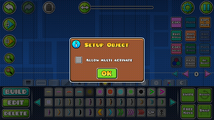 Orb setup menu
 -
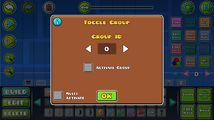 Toggle Orb edit menu
 -
 Setting indicators for orbs


